
 Posted by
 Learn how to improve SEO on website with practical strategies for higher Google rankings, better visibility, more organic traffic, keyword optimization, quality content, technical SEO, backlinks, and improved user experience.
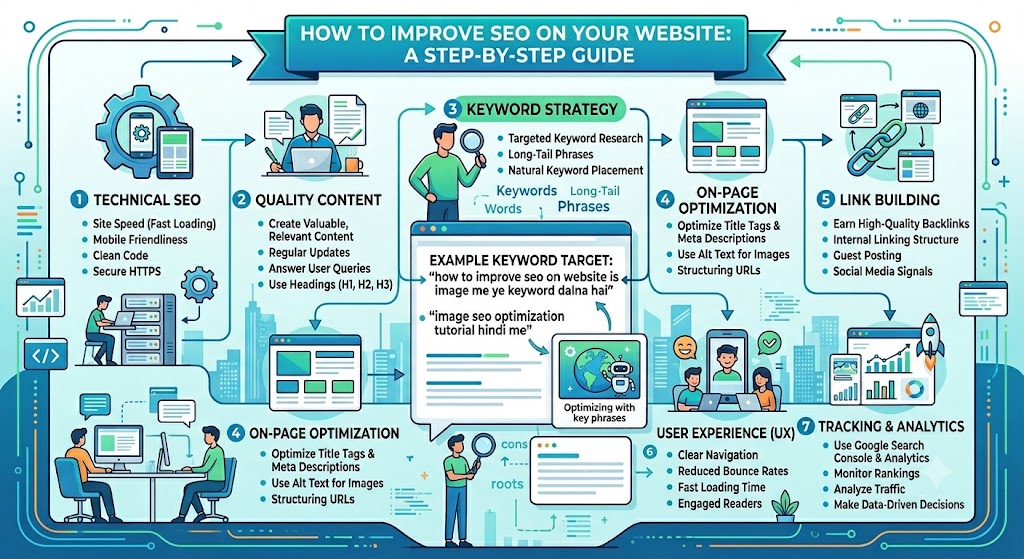
How to Improve SEO on Website: A Complete Guide to Better Google Rankings
If you want to increase your website traffic, improve your Google rankings, and attract more potential visitors, learning how to improve SEO on website is essential. Search engine optimization (SEO) helps search engines understand your content and helps users find your website when they search for relevant information.
A successful SEO strategy is not based on one single technique. It involves keyword research, high-quality content, technical SEO, on-page optimization, backlinks, website speed, mobile usability, and a positive user experience.
In this guide, you will learn how to improve SEO on your website and build a long-term SEO strategy that can help increase organic traffic.
What Is SEO?
SEO stands for Search Engine Optimization. It is the process of improving a website and its content so that search engines can better understand, index, and rank its pages.
When someone searches Google for a topic related to your website, SEO helps your pages become more visible in search results.
For example, if you have a website about technology and publish an article targeting the keyword “best free SEO tools,” proper SEO can help that article appear when people search for that topic.
SEO generally includes several important areas:
- Keyword research
- On-page SEO
- Technical SEO
- Content optimization
- Link building
- User experience
- Mobile optimization
- Website performance
- Local SEO
How Can I Improve My SEO Strategy for My Website?
If you are wondering how can I improve my SEO strategy for my website, start by focusing on the fundamentals rather than trying to use every SEO technique at once.
A strong SEO strategy should include:
- Finding the right keywords
- Creating useful and original content
- Optimizing page titles and headings
- Improving website speed
- Making the website mobile-friendly
- Creating a logical internal linking structure
- Building high-quality backlinks
- Improving technical SEO
- Monitoring Google Search performance
- Updating older content regularly
Let’s look at each strategy in detail.
1. Perform Keyword Research
Keyword research is one of the first steps when improving SEO.
Keywords are the words and phrases people type into search engines. Understanding what your audience searches for allows you to create content that matches their needs.
Instead of choosing keywords only because they have high search volume, consider search intent, competition, relevance, and the type of content already ranking in Google.
For example, instead of targeting a highly competitive keyword such as “SEO,” a smaller website might target more specific keywords such as:
- How to improve SEO on website
- How to improve SEO for a small business website
- How to improve website SEO
- How to get more organic traffic
- How to optimize a website for Google
Long-tail keywords can be useful because they are more specific and often match a user’s exact search intent.
2. Create High-Quality, Helpful Content
Content is one of the most important parts of SEO.
Your content should provide a clear answer to the user’s question rather than simply trying to include keywords as many times as possible.
When creating an article, focus on:
- Providing accurate information
- Answering the main question
- Covering important subtopics
- Using clear headings
- Adding useful examples
- Keeping information up to date
- Avoiding unnecessary repetition
- Writing for people first
Your goal should be to create a page that is genuinely useful to someone who arrives from Google.
3. Optimize Your Page Title
The page title is an important on-page SEO element.
Your title should clearly explain what the page is about and encourage users to click.
For example:
How to Improve SEO on Website: 10 Proven Strategies
is more descriptive than:
SEO Tips
Try to naturally include your primary keyword in the title when appropriate.
Avoid stuffing multiple keywords into the title because it can make the title look unnatural.
4. Write a Strong Meta Description
A meta description gives searchers a short summary of your page.
Although the meta description itself is not a direct Google ranking factor, a useful description can help users understand what they will find on your page and may improve click-through behavior.
For example:
how to open trump account

Learn how to improve SEO on your website with practical strategies for higher rankings, better visibility, organic traffic, technical SEO, content optimization, backlinks, and user experience.
Keep your description clear, relevant, and focused on the value of the page.

5. Use Proper Heading Structure
Headings make your content easier to understand for both users and search engines.
Use one main H1 heading for the page and organize the rest of your content using H2 and H3 headings.
For example:
- H1: How to Improve SEO on Website
- H2: What Is SEO?
- H2: How Can I Improve My SEO Strategy?
- H2: Improve Website Speed
- H2: Build Quality Backlinks
- H3: Guest Posting
- H3: Digital PR
A logical heading structure also makes long articles easier to scan.
6. Improve Your Website’s Loading Speed
Website speed can affect user experience and performance in search.
A slow website can frustrate visitors and may cause them to leave before the page loads.
To improve website speed:
- Compress large images
- Use modern image formats when appropriate
- Reduce unnecessary plugins
- Minimize unnecessary JavaScript
- Use browser caching
- Use a reliable hosting provider
- Enable compression
- Remove unused website resources
- Consider using a content delivery network (CDN)
You should regularly test your website performance and identify the resources causing slow loading times.
7. Make Your Website Mobile-Friendly
Many people access websites using smartphones and tablets.
Your website should therefore work properly across different screen sizes.
Check that:
- Text is easy to read
- Buttons are easy to tap
- Images fit the screen
- Navigation works correctly
- Content does not overflow horizontally
- Pages load quickly on mobile devices
A responsive website provides a better experience for mobile users and supports your overall SEO strategy.
8. Improve Internal Linking
Internal links connect one page on your website to another page on the same website.
For example, if you have an article about SEO keyword research, you can link it to another article about on-page SEO.
Internal linking can help:
- Users discover related content
- Search engines discover pages
- Search engines understand the relationship between pages
- Distribute internal authority throughout your website
- Improve website navigation
Use descriptive anchor text rather than generic phrases such as “click here.”
9. Build High-Quality Backlinks
Backlinks are links from other websites to your website.
High-quality, relevant backlinks can help establish your website’s authority.
However, you should focus on earning legitimate links rather than purchasing large numbers of low-quality links.
Some ways to earn backlinks include:
- Creating original research
- Publishing useful guides
- Creating statistics and data
- Digital PR
- Guest contributions on relevant websites
- Creating useful resources
- Building relationships with websites in your industry
Quality and relevance are generally more important than simply collecting a large number of backlinks.
10. Optimize Your Images
Images can improve your content, but poorly optimized images can slow down your website.
Use descriptive file names and appropriate alternative text.
For example, instead of:
IMG12345.jpg
you could use:
website-seo-strategy.jpg
Alt text should describe the image when the image provides meaningful information.
Avoid filling alt text with unnecessary keywords.
You should also resize and compress images before uploading them whenever possible.
11. Improve Your URL Structure
Your URLs should be simple, descriptive, and easy to understand.
For example:
example.com/how-to-improve-seo-on-website/
is easier to understand than a URL containing a long string of random numbers and characters.
Keep URLs:
- Short when possible
- Descriptive
- Relevant to the page
- Easy to read
- Consistent
Avoid changing URLs unnecessarily because URL changes can create redirects and indexing issues.
12. Improve Technical SEO
Technical SEO helps search engines crawl, understand, and index your website.
Important technical SEO areas include:
- XML sitemap
- Robots.txt
- Canonical URLs
- HTTPS
- Mobile usability
- Page speed
- Structured data
- Redirects
- Broken links
- Crawl errors
- Indexing
- Duplicate content
You should regularly check your website for technical problems.
13. Submit Your Sitemap to Google
An XML sitemap helps search engines discover important URLs on your website.
Make sure your sitemap contains the pages you actually want search engines to index.
For many websites, the sitemap can be submitted through Google Search Console.
After making major website changes, checking your sitemap and indexing status can help identify potential problems.
14. Use Google Search Console
Google Search Console is one of the most useful free tools for website SEO.
It can help you monitor:
- Search queries
- Clicks
- Impressions
- Average position
- Indexed pages
- Indexing issues
- Sitemap status
- Search performance
- Core Web Vitals
- Mobile-related issues
One useful SEO strategy is to identify pages that receive many impressions but relatively few clicks.
You can then improve their titles and descriptions to make them more attractive and relevant to searchers.
15. Update Old Content
SEO does not end when you publish an article.
Information can become outdated, competitors can publish better content, and search intent can change.
Review important older pages regularly.
When updating an article:
- Add new information
- Remove outdated information
- Improve headings
- Add relevant internal links
- Update statistics
- Improve readability
- Fix broken links
- Improve images
- Expand sections that need more explanation
Do not update an article simply to change the publication date. Make meaningful improvements that provide additional value.
16. Improve User Experience
SEO is closely connected to user experience.
A visitor should be able to quickly find the information they need.
Avoid excessive:
- Pop-ups
- Intrusive advertisements
- Auto-playing videos
- Difficult navigation
- Huge blocks of text
- Unnecessary animations
Use clear navigation, readable fonts, logical sections, and helpful links.
A website that is easy to use can encourage visitors to explore more pages.
17. Create Content Around Search Intent
Search intent is the reason behind a user’s search.
For example, someone searching for:
“what is SEO”
is probably looking for an explanation.
Someone searching for:
“best SEO tools”
may be comparing different tools.
Someone searching for:
“buy SEO software”
may have a transactional intent.
Before creating content, search your target keyword and examine the type of pages Google currently displays.
Your content should satisfy the intent behind the query.
18. Avoid Keyword Stuffing
Keyword stuffing means repeatedly inserting the same keyword into a page in an unnatural way.
For example, repeatedly writing:
“how to improve SEO on website”
in every paragraph can make the article difficult to read.
Instead, use natural variations such as:
- Improve website SEO
- Improve SEO for your website
- Website SEO strategy
- SEO optimization
- Search engine optimization
- Improve organic search traffic
Write naturally and focus on helping the reader.
19. Use Structured Data When Appropriate
Structured data provides search engines with additional information about your content.
Depending on your website, you may use structured data for things such as:
- Articles
- Products
- Reviews
- Events
- FAQs
- Organizations
- Local businesses
- Breadcrumbs
Structured data does not guarantee enhanced search results, but valid structured data can help search engines better understand eligible content.
20. Fix Broken Links and 404 Errors
Broken links create a poor user experience and can make website maintenance more difficult.
Regularly check your website for:
- Broken internal links
- Broken external links
- Missing pages
- Incorrect redirects
- 404 errors
If an old page has been permanently replaced by another relevant page, a proper 301 redirect may be appropriate.
Do not redirect every deleted URL to your homepage. Redirect users to the most relevant replacement page when one exists.
21. Create a Strong Content Structure
A successful website should have a logical content structure.
For example, an SEO website could have categories such as:
- SEO
- Keyword Research
- Technical SEO
- Link Building
- Content Marketing
- Local SEO
- WordPress SEO
You can then create detailed articles under each topic.
This approach helps users navigate your website and allows you to build topical coverage around important subjects.
22. Build Topic Authority
Instead of publishing random articles, create multiple useful pieces of content around related topics.
For example, if your main topic is SEO, you could create articles about:
- Keyword research
- On-page SEO
- Technical SEO
- Internal linking
- Backlinks
- Image SEO
- Local SEO
- SEO tools
- Google Search Console
- Website speed
You can connect these articles with internal links to create a comprehensive resource.
23. Optimize for Local SEO
If your business serves a specific geographic area, local SEO can help you reach nearby customers.
Optimize your website with accurate business information and create location-specific content when it is genuinely useful.
Important local SEO elements can include:
- Business name
- Address
- Phone number
- Business hours
- Location pages
- Customer reviews
- Local business structured data
- Business listings
Make sure your business information is consistent across important platforms.
24. Use Analytics to Measure SEO Performance
You cannot improve what you do not measure.
Use analytics and search performance tools to monitor your SEO results.
Important metrics can include:
- Organic clicks
- Organic impressions
- Search rankings
- Organic sessions
- Conversion rate
- Engagement
- Top landing pages
- Top search queries
Do not focus only on rankings. The ultimate goal is to attract the right visitors and achieve meaningful business or website goals.
25. Create an SEO Strategy for the Long Term
SEO usually requires consistent effort.
Instead of expecting immediate results, create a long-term plan.
A simple SEO workflow could look like this:
Step 1: Research keywords and topics.
Step 2: Analyze search intent and competing pages.
Step 3: Create useful, original content.
Step 4: Optimize titles, headings, URLs, images, and internal links.
Step 5: Improve technical SEO.
Step 6: Promote your content and earn relevant backlinks.
Step 7: Monitor search performance.
Step 8: Update and improve important pages.
Repeating this process can help your website build stronger organic search visibility over time.
Common SEO Mistakes to Avoid
When trying to improve SEO on a website, avoid these common mistakes:
- Keyword stuffing
- Publishing low-quality content
- Copying content from other websites
- Buying spammy backlinks
- Ignoring mobile users
- Using slow hosting
- Creating too many thin pages
- Ignoring technical SEO
- Using misleading titles
- Creating content without understanding search intent
- Ignoring internal linking
- Never updating old content
- Creating pages only for search engines
The best approach is to build a website that provides genuine value to visitors.
How Long Does SEO Take to Work?
SEO results vary from website to website.
The timeline can depend on factors such as:
- Website age
- Competition
- Content quality
- Website authority
- Technical condition
- Backlink profile
- Search demand
- Industry
- Consistency of SEO efforts
Some pages may begin receiving search traffic relatively quickly, while competitive keywords can take much longer.
SEO should therefore be treated as a long-term strategy rather than a quick traffic solution.
Final Thoughts
If you want to know how to improve SEO on website, start with the fundamentals: create helpful content, target relevant keywords, optimize your pages, improve website speed, make your site mobile-friendly, strengthen internal linking, fix technical problems, and earn high-quality backlinks.
The most effective SEO strategy is not about manipulating search engines. It is about creating a website that search engines can understand and users genuinely find useful.
Focus on solving your audience’s problems, regularly monitor your performance, and continue improving your content and website experience. Over time, these efforts can help increase your organic visibility, attract more relevant visitors, and build a stronger online presence.