 Posted by
 create bootable windows 10 pendrive
Creating a bootable USB drive for Windows 10 or 11 is straightforward. Here’s a step-by-step guide: How to create bootable windows 10 pendrive
Table of Contents
Prerequisites
- USB Drive: At least 8 GB of storage capacity.
- Windows ISO File: Download the Windows 10 or 11 ISO file from Microsoft’s official website.
- Rufus Tool: A free utility to create bootable USB drives. Download it from Rufus Website.
Steps to Create a Bootable USB Drive
Option 1: Using Microsoft’s Media Creation Tool
- Download and Install Tool:
- Visit the Microsoft website and download the Media Creation Tool for Windows 10 or 11.
- Run the Tool:
- Launch the Media Creation Tool as Administrator.
- Choose Action:
- Select “Create installation media (USB flash drive, DVD, or ISO file) for another PC.”
- Select Preferences:
- Choose the language, edition (Windows 10 or 11), and architecture (64-bit/32-bit).
- Insert USB Drive:
- Connect the USB drive to your computer.
- Create Bootable Drive:
- Select the USB drive, and the tool will download Windows files and create the bootable drive.
- Completion:
- Once done, eject the USB drive safely.
Option 2: Using Rufus
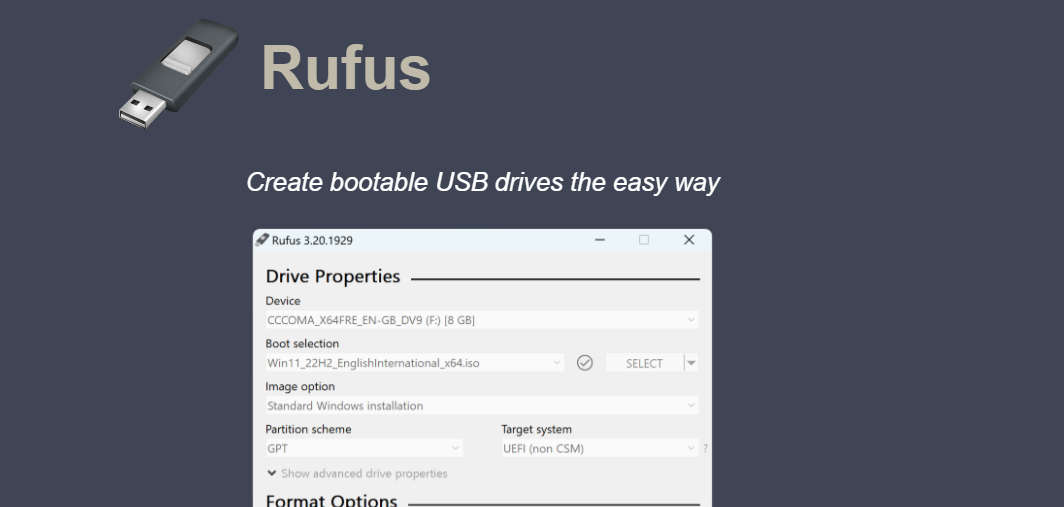
- Download and Install Rufus:
- Install Rufus on your computer.
- Launch Rufus:
- Insert the USB drive into your computer and open Rufus.
- Select ISO File:
- Under “Boot Selection,” click on the “SELECT” button and browse to the Windows ISO file.
- Configure Settings:
- Partition Scheme: GPT (for UEFI systems) or MBR (for legacy BIOS).
- File System: NTFS (preferred).
- Start the Process:
- Click “START” to begin creating the bootable USB.
- Confirm if any warnings about data loss appear.
- Wait for Completion:
- Rufus will complete the process and notify you when done.
- Eject USB:
- Safely remove the USB drive.
Using the Bootable USB
- Insert USB:
- Plug the USB drive into the computer you want to install Windows on.
- Enter Boot Menu:
- Restart the computer and press the designated key (e.g., F2, F12, DEL, ESC) to access the boot menu.
- Select USB Drive:
- Choose the USB drive from the list to boot from it.
- Follow Installation Instructions:
- Proceed with the on-screen prompts to install Windows.
Here’s a detailed expansion on each method and troubleshooting tips for creating a bootable Windows USB drive:
Detailed Steps for Option 1: Using Microsoft’s Media Creation Tool
1. Download the Media Creation Tool
- Go to the official Windows 10 or Windows 11 download page.
- Click “Download tool now.”
2. Run the Tool
- After downloading, double-click the Media Creation Tool file to launch it.
- Accept the license agreement.
3. Select Your Purpose
- Choose “Create installation media for another PC” and click Next.
4. Choose Settings
- Select the preferred Language, Edition (e.g., Windows 10 Home/Pro), and Architecture (64-bit/32-bit).
(Tip: If unsure, use the “Use the recommended options for this PC” checkbox.)
5. Select USB Drive
- Insert your USB drive into the computer and ensure it’s detected.
- Select USB flash drive as the media to use and click Next.
6. Download and Create Bootable USB
- The tool will download Windows files and write them to your USB drive.
- Once completed, you’ll see a confirmation message.
7. Finalize
- Eject the USB drive safely by right-clicking its icon in File Explorer and selecting Eject.
Detailed Steps for Option 2: Using Rufus
1. Download Rufus
- Visit Rufus Official Website and download the latest version.
2. Prepare USB Drive
- Insert your USB drive into your computer.
- Ensure it has at least 8 GB of space and is empty (Rufus will erase all data).
3. Configure Rufus
- Open Rufus and locate your USB drive in the Device dropdown.
- Under Boot selection, click SELECT and choose your downloaded Windows ISO file.
4. Adjust Partition Scheme
- Set the Partition scheme based on your system:
- GPT for UEFI (modern systems).
- MBR for legacy BIOS (older systems).
5. Start the Process
- Click START, and Rufus will prompt you for confirmation.
- Select your preferred Windows installation mode (Standard or with custom files).
6. Monitor Progress
- Rufus will format the USB drive, copy Windows files, and create the bootable media.
- Wait for the process to finish; it can take 10-20 minutes.
7. Eject the Drive
- Once completed, eject the USB drive safely.

Troubleshooting Common Issues
1. USB Drive Not Detected
- Ensure your USB drive is properly inserted.
- Try plugging it into a different USB port.
- Use Disk Management to check if the drive is recognized (press
Win + X→ Disk Management).
2. Rufus Errors
- Ensure the ISO file is not corrupted by re-downloading it.
- Run Rufus as Administrator.
- Check the log in Rufus for detailed error messages.
3. Cannot Boot from USB
- Access the BIOS/UEFI settings and ensure USB boot is enabled.
- Adjust the boot order to prioritize the USB drive.
- Ensure the USB drive is fully formatted and bootable.
4. Slow Creation Process
- Use a USB 3.0 drive and port for faster data transfer.
- Close background applications during the creation process.
Using the Bootable USB for Installation
- Boot from USB
- Restart the target computer and enter the boot menu by pressing the specific key (e.g., F2, F12, Esc, Del) during startup.
- Select Installation Options
- Choose the language, time, and keyboard preferences, then click Next.
- Install Windows
- Select Install Now and follow the on-screen instructions.
- Enter your product key or skip it to activate later.
- Partition the Drive
- Choose the partition where Windows will be installed. Format it if necessary.
- Complete Installation
- Wait for the installation to finish. The system will restart several times during the process.
Would you like more help with troubleshooting or advanced configuration options?
9Best Free AI Tools
- what is technical seo Audit: The Complete Technical SEO Audit Checklistwhat is technical seo audit is one of the most important steps you can take to improve your website’s search visibility, organic traffic, and overall performance.
- Best 8 way fix slow upload speed on both mobile and PC/laptopSure! Here’s a complete English guide on how to fix slow upload speed on both mobile and PC/laptop, written clearly and without using icons: Full Guide:
- How to redirect post wordpress | redirect post meaningTo redirect posts WordPress, you can use different methods, including plugins or manual code changes. Here’s how you can do it: redirect post meaningredirect post wordpress
- how to open trump account for Kids : $1,000 Trump Account ExplainedHow to Open a Trump Account for Kids in 2026: $1,000 Trump Account Explained The new Trump Account is attracting a lot of attention from parents
- How to Fix Slow Internet Speed: 10+ Ways to Fix a Slow Internet ConnectionHow to Fix Slow Internet Speed: 10+ Ways to Fix a Slow Internet Connection Learn how to fix slow internet speed, troubleshoot a slow internet connection,
- Best investment apps 2026Here’s a detailed list of the Best Investment Apps, based on ease of use, returns, features, and user reviews, suitable for both beginners and serious investors.
- Wix Search Console Verification: How to Connect a Wix Website to Google Search Console 2026Learn how to complete Wix Search Console verification, connect a Wix website to Google Search Console, submit your sitemap, and fix common Wix SEO issues. wix
- How to Get a Social Security Number in the US (SSN): Complete 2026 GuideLearn how to get a Social Security Number in the US 2026. Discover who can apply, required documents, online application steps, fees, age requirements, and official
- How to green card apply online in the USA in 2026: Complete Guide, Requirements, Process and FeesLearn how to get a green card apply online in the USA in 2026. This complete guide explains Green Card eligibility, requirements, documents, application process, fees,
- Summer Nails Ideas: 50+ Cute, Trendy & Easy Summer Nail Designs for 2026Summer Nails Ideas: 50+ Cute, Trendy & Easy Summer Nail Designs for 2026 Summer nails ideas are all about bright colors, fresh patterns, playful details, and
- make money on survey | Make Money online high-paying survey websites 2026make money on survey | Make Money online with high-paying online survey websites that are trusted, legit, and offer better payouts than typical platforms. These can
- Best investment apps reddit: Autopilot, Robinhood, Fidelity & MoreAaj kal stock market aur crypto me invest karne ke liye hazaron options hain, lekin Reddit users (r/investing, r/WallStreetBets, r/PersonalFinance) par kis app par sabse zyada
- how to change an app’s name | how to change app name in androidHow to change app name in android (Complete Beginner Guide) Changing an Android change app name is one of the easiest tasks in Android development. Whether
- Ultimate kuwait money to indian money Conversion GuideKuwait Money to Indian Money & kuwait dinar to indian rupee : Exchange Rate, Kuwait Money Value in India & Why Kuwaiti Dinar Is More Valuable
- best trading platform in kuwait | Ultimate Guide to Trading in Kuwait Stock MarketTrading Companies in Kuwait: Best Trading Platform Kuwait & How to Trade in Kuwait Stock Market Additionally, discover best trading platform in kuwait and compare top
- aws amazon certification : Complete Beginner’s Guide to AWS Certifications | aws amazon certification cost 2026aws amazon certification cost | AWS Amazon.com Certification: The Complete Beginner’s Guide to Building a Successful Cloud Career Want to pass your aws amazon certification? Check
- (no title)By Baljeet Yadav
- how to improve seo on website | How can I improve my SEO strategy for my website?Learn how to improve SEO on website with practical strategies for higher Google rankings, better visibility, more organic traffic, keyword optimization, quality content, technical SEO, backlinks,
- What is Somatic Yoga | Is Yoga a Sin | Is Yoga DemonicHere’s a full, detailed explanation What is Somatic Yoga of the following topics with a comparative table: 1. What is Somatic Yoga? Somatic Yoga combines traditional
- 9 best blogging platform to make money9 Best Blogging Platforms to Make Money Introduction 9 Best Blogging Platforms to Make Money – Blogging has become one of the most effective ways to